
What is a Resetter Key? Complete Guide for Epson Printers
If you own an Epson printer, chances are you’ve encountered the dreaded “Service Required” or “Waste Ink Pad Counter Full” error. This usually happens when your printer’s internal waste ink pad becomes saturated with excess ink. Fortunately, there’s a simple solution: the Resetter Key.
In this guide, we’ll explain what a resetter key is, how it works, and why it’s an essential tool for keeping your printer running smoothly.
What is the Resetter Key?
The Resetter Key is a digital code used with Resetter software to reset your printer’s waste ink pad counter.
Every inkjet printer has a built-in waste ink pad that collects unused ink during cleaning cycles and printing. Once this pad reaches its limit, the printer stops working and displays an error such as:
- SERVICE REQUIRED – “A printer’s ink pad is at the end of its service life”
- “The ink pad needs service”
- “A part inside your printer is at the end of its service life”
- “A printer’s ink pad is nearing the end of its service life”
- “The ink pad is nearing the end of service life”
- “Cannot run borderless printing until the part is replaced”
- “The printer’s borderless printing ink pad has reached the end of its service life. It is not a user-replaceable part”
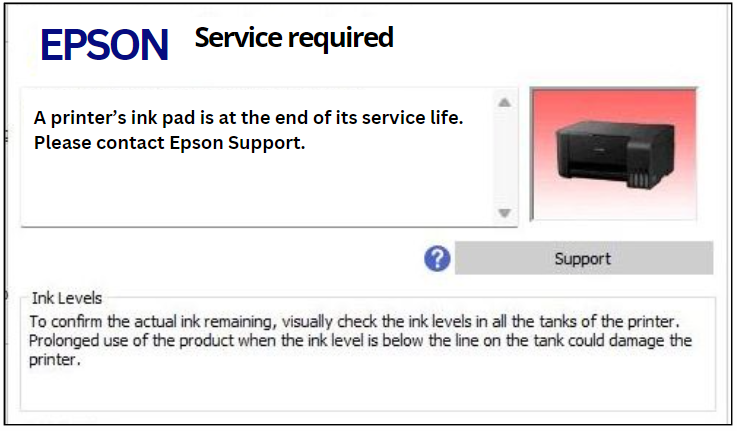
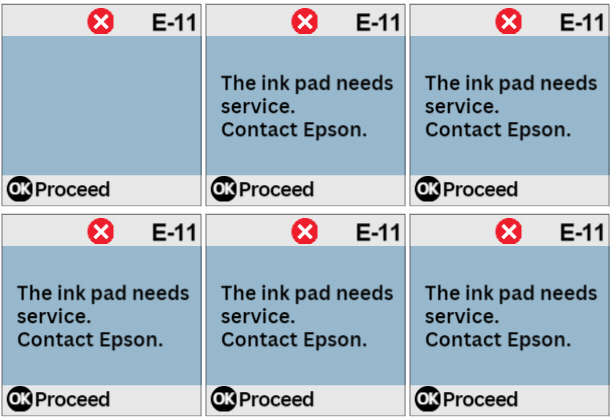
This safeguard prevents ink overflow and protects your printer, but it can also be frustrating if the printer stops working while you still need it.
That’s where the resetter key comes in—it clears the counter and lets you continue printing without costly repairs.
How Does the Resetter Key Work?
Using a resetter key is simple and doesn’t require technical expertise. Here’s a step-by-step process:
- Download and run the Resetter
Get the software compatible with your operating system (Windows only). - Connect Your Printer
Use a USB cable to connect your Epson printer to your computer. Ensure it’s powered on. - Launch the Resetter
Follow the on-screen instructions. - Enter Your Reset Key
Input the purchased reset key code into the program. - Reset the Waste Ink Counter
The on-screen instructions will be displayeduntil the waste ink pad counter has been reset. - Verify the Reset
Print a test page to confirm that your printer is back to normal operation.
How does it works?
|
Reset key |
Purchase |
|---|---|
 |
 |
|
|
 |
Why is the Resetter Key Important?
- ✅ Extend Printer Life – Prevents downtime and keeps your printer in service for years.
- ✅ Save Money – Avoid costly repairs or replacing your printer when only the waste ink counter is full.
- ✅ Quick and Easy – The reset process takes just a few minutes and can be done at home.
- ✅ Environment-Friendly – Reduces unnecessary printer waste by maximizing your device’s lifespan.
When Should You Use a Resetter Key?
- When you see an error message such as “Ink Pad Full” or “Service Required.”
- For routine maintenance, especially if you use your printer heavily.
- Before selling or donating your printer so the next owner won’t encounter waste ink errors.
Troubleshooting Common Issues
- Software not detecting your printer? Check USB connections and ensure the printer is powered on.
- Compatibility issues? Make sure you downloaded the correct version of the WIC Reset Utility for your operating system.
- Reset not working? Re-run the process or consult the utility’s support guide.
Final Thoughts
The Resetter Key is a must-have tool for Epson printer owners. Instead of replacing your printer or paying for expensive servicing, you can simply reset the waste ink counter at home.
By understanding how the reset key works, when to use it, and how to troubleshoot common issues, you’ll save time, money, and extend your printer’s lifespan.
👉 Whether you’re a business owner, student, or home user, the resetter key offers a practical, cost-effective solution to keep your printer running smoothly.